3D Print Ghosting and Ringing: What Causes Ripples and How to Fix Them
Faint echoes on the wall right after a corner or a raised letter are ghosting, also called ringing. It has one main cause and a short list of fixes, and most of them are free.
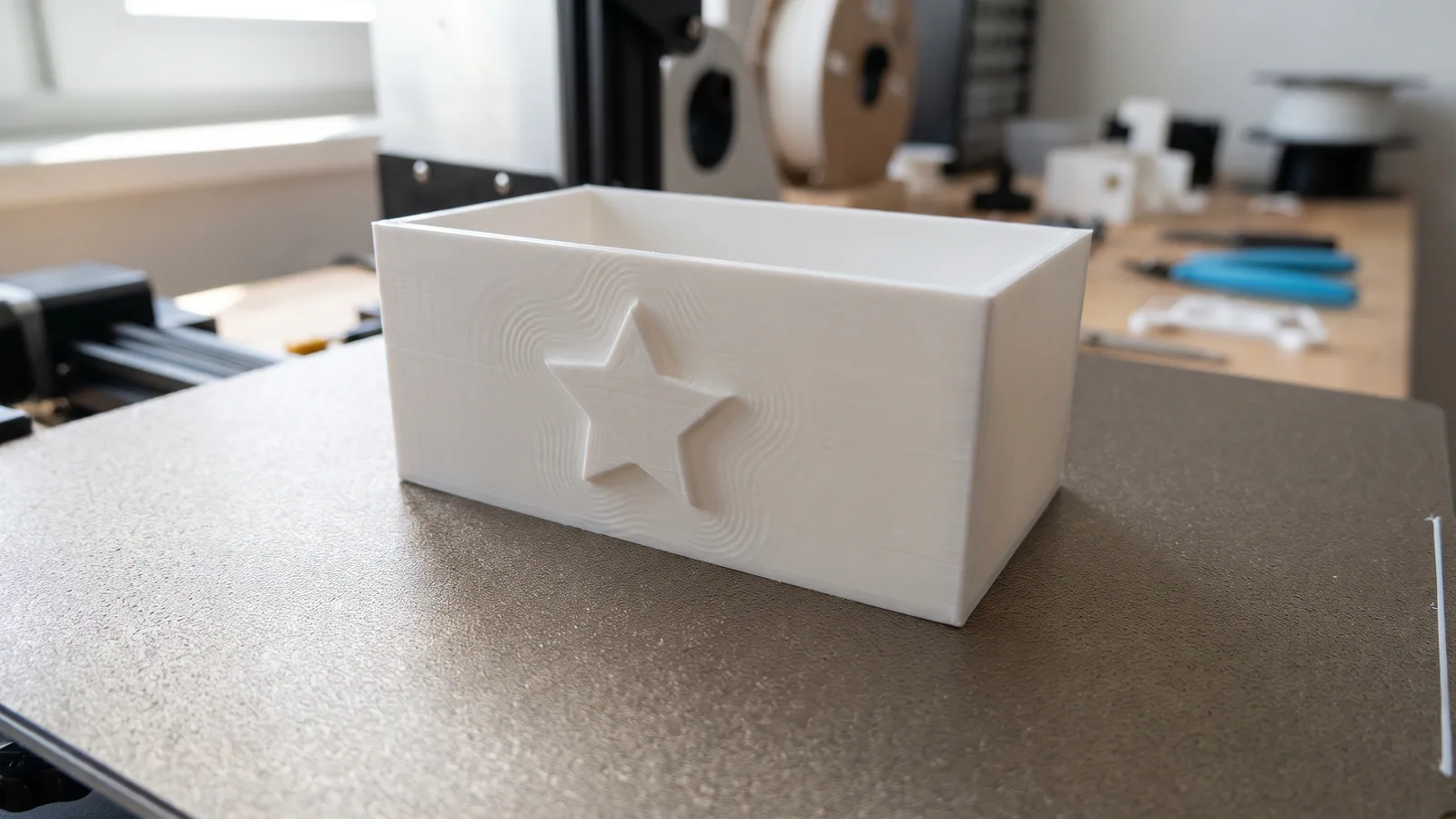
You print a box with some letters on the side, and right after each letter or sharp corner there is a faint echo: a few ripples on the wall, as if the shape had been stamped again a millimetre further along. That is ghosting, also called ringing or echoing. It does not make a part weaker, but on anything you give as a gift or sell at a market it is the first thing a careful buyer notices.
The good news is that ghosting has one main cause and a short list of fixes, and most of them cost nothing. This guide explains what is happening, how to tell ghosting apart from other wall defects, what to change in the slicer and on the printer, and in what order. If you print our ready-to-print designs, the last section shows the real wall speeds saved in our own project files.
What is ghosting in 3D printing?
Ghosting is a pattern of ripples on a wall that repeats a shape just printed nearby. You see it right after sharp corners, holes, raised letters and logos: a line of fading waves running away from the feature in the direction the print head was moving.
Prusa's knowledge base describes it as several waves that follow a sharp edge of a model. The two names mean the same thing. "Ghosting" describes how it looks (a ghost of the feature), "ringing" describes the cause (the printer rings like a struck bell).
What causes ghosting and ringing?
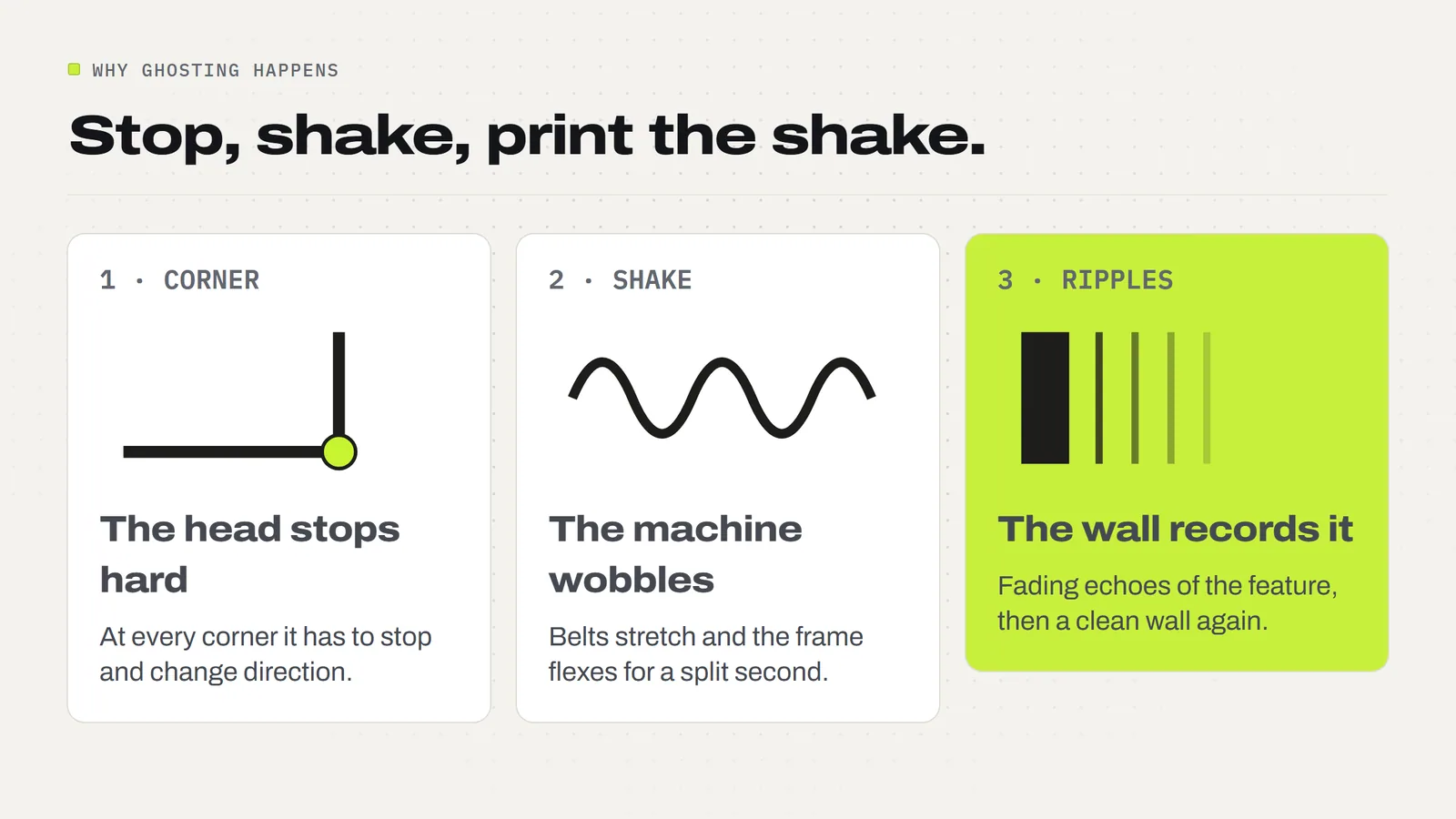
Vibration. A print head (or, on a bed-slinger like the A1, the whole bed) is a weight moving fast. When it reaches a corner it has to stop and change direction in a split second. The belts stretch a tiny bit, the frame flexes a tiny bit, and the whole machine wobbles back and forth a few times before it settles. The nozzle is still printing while that happens, so the wobble is drawn into the wall as ripples.
Three things make that wobble bigger:
- Acceleration. How hard the printer speeds up and slows down. Higher acceleration means a harder stop at every corner and more shake afterwards. Polymaker's wiki calls too-high acceleration and jerk the number one reason it happens.
- Speed. Faster walls mean the ripples are stretched over a longer, more visible stretch. Prusa notes that the vibrations increase with print speed.
- A loose or wobbly machine. Slack belts, loose screws, or a printer standing on a flimsy table that rocks along with it. Anything that lets the machine move after the motors stop makes the ringing last longer.
The weight of what is moving matters too. Polymaker points out that printers which throw the bed back and forth suffer more than CoreXY machines, because the bed (and your print on it) is a lot of mass to stop.
How do you tell ghosting from other wall problems?
Several defects make lines on a wall. They have different causes, so it pays to name the right one before changing settings.
| What you see | Most likely | Where it shows | First thing to try |
|---|---|---|---|
| Fading ripples just after a corner, hole or letter | Ghosting (ringing) | Only near sharp features, on the side the head moved toward | Run vibration calibration, lower outer wall acceleration |
| Even horizontal stripes all the way up the part | Banding (Z wobble, temperature swings or uneven layers) | The whole height of the wall, every side | Check the Z axis and the layer height |
| Fine, even vertical ridges everywhere on the wall | Vertical fine artifacts (motor or belt pattern) | The whole wall, not tied to corners | Check belts, pulleys and motor noise calibration |
| Gaps, thin walls, missing lines | Under extrusion | Anywhere, often worse at speed | Clean the nozzle, check the filament |
| A ridge or zit in one line up the side | The seam | One spot per layer, lined up | Move the seam to the back |
The quick test for ghosting: does the pattern start at a feature and fade out within a centimetre or two? If yes, it is ringing. If the lines run evenly across a plain wall with no corner nearby, it is something else.
How do you fix ghosting? Seven fixes in order
Work down this list one change at a time. The first three are free and take minutes; most ghosting on a Bambu printer is gone by step three.
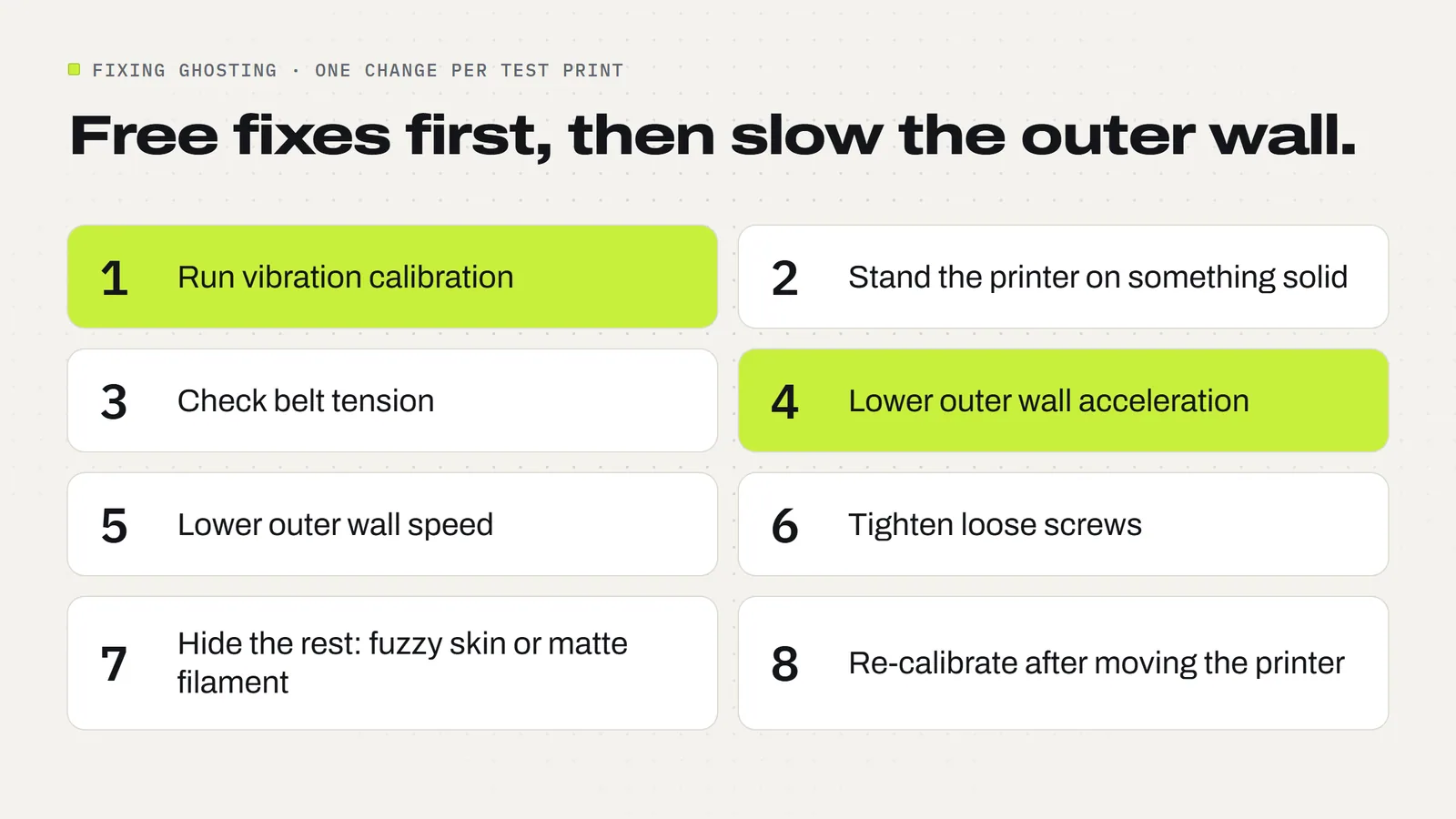
- Run the printer's vibration calibration. Bambu printers measure how the machine shakes and then cancel that frequency out while they print (Bambu calls this vibration or resonance compensation; the general name is input shaping). It runs during the startup calibration, and you can start it again from the printer screen, the Device tab in Bambu Studio or Bambu Handy. Run it again whenever you move the printer, put it on a different table, or change or retension a belt, because the way the machine shakes changes with all three.
- Put the printer on something solid. A heavy table against a wall, a paving slab or a thick wooden board under the printer all help. A light folding table or a shelf that sways turns the whole table into part of the wobble. Prusa's guide says it is always better to place the printer on a firm surface.
- Check the belts. A belt should be firm, and on printers where you set it by hand, Prusa's tip is that a plucked belt should give a low bass note. Too loose lets the head bounce; too tight wears the pulleys. On Bambu printers, follow the belt-tension steps in the printer's own wiki maintenance guide rather than guessing.
- Lower the outer wall acceleration. In Bambu Studio this is in the process settings, Speed tab, Acceleration, Outer wall. Dropping it is the single most effective slicer change, because the outer wall is the only one anyone sees. Inner walls and infill can stay fast.
- Lower the outer wall speed. Same tab, Outer wall speed. A slower outer wall gives the vibration less distance to draw itself across. It adds time only to the outside skin, not the whole print.
- Tighten anything loose. Screws on the frame, the toolhead, the spool holder. On older or home-built printers, worn wheels and loose eccentric nuts cause ringing that no setting will fix.
- Hide what is left. If a part is decorative, fuzzy skin covers light ringing, and a matte or silk filament shows it less than a glossy one.
Change one thing, print the same small test again, compare. If you change three settings at once and the ripples go away, you will not know which one did it, and you will pay for the other two in print time on every part from then on.
What speed and acceleration should I use to stop ringing?
There is no single right number, because it depends on the printer. A modern Bambu printer with vibration compensation can print outer walls fast and stay clean; an older printer without it may need to slow right down. In our own files, the slow profiles use 40 mm/s at 2,000 mm/s² on the outer wall, which is a reasonable place to start testing on any printer.
Here is a sensible way to find your own numbers:
- Start from the stock profile for your printer in Bambu Studio. It is tuned for that machine.
- If you see ghosting after calibration, halve the outer wall acceleration and print a small test with a raised letter or a sharp corner.
- If it is better but not gone, lower the outer wall speed too. If it is gone, try raising one value back up until the ripples just start, then step down once.
Polymaker's own test shows what the trade looks like: the same part printed with lower acceleration and jerk came out clean and took 1 hour 50 minutes instead of 1 hour 36. Slowing only the outer wall keeps that cost small.
How are wall speeds set in 3MF Labs files?
We read the saved settings in every 3MF project file in our product folders on 23 November 2026: 640 project files across 156 product folders, all saved for the Bambu Lab P2S. Two clear groups came out of it.
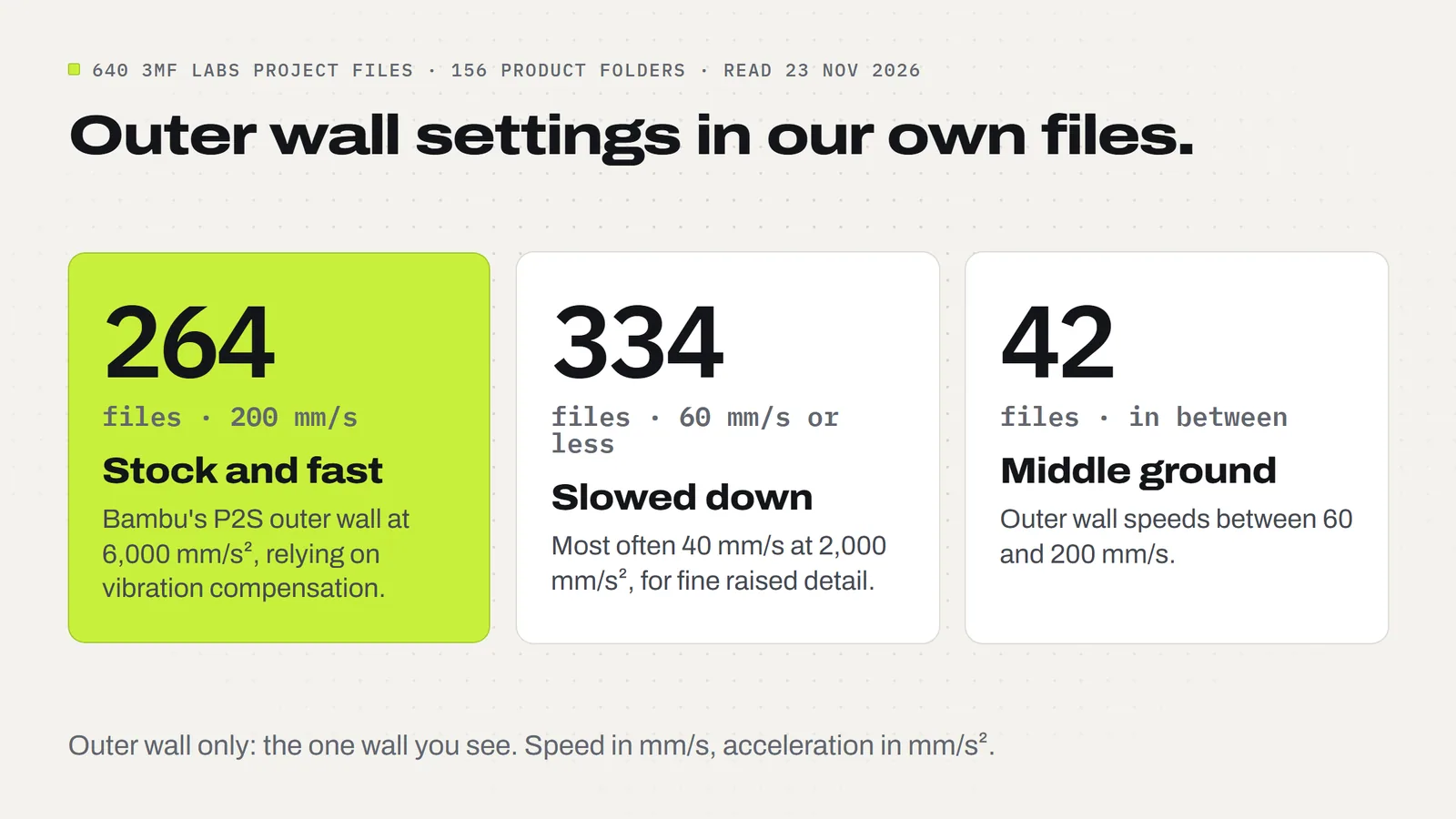
- 264 files use Bambu's stock outer wall: 200 mm/s at 6,000 mm/s². They include the Twisted Heart Vase, the Igloo Tealight House, the Snowflake Coaster Set and the Monster Truck. They rely on the printer's vibration compensation to keep walls clean at that speed.
- 334 files slow the outer wall to 60 mm/s or less. The most common setting is 40 mm/s at 2,000 mm/s² (196 files). These are older custom profiles for parts with fine raised detail, such as ornaments and the Mardi Gras Mask, where a clean edge matters more than a few minutes.
- The other 42 sit in between.
What that means for you: if you print one of our files on the printer and plate it was saved for and see ghosting, run the vibration calibration first, because the stock files expect it. If you print on a different printer, Bambu Studio swaps in that printer's own process profile, and the seven fixes above apply as written. Lowering the outer wall values in the project is safe; it changes the print time, not the fit of the parts.
Does ghosting matter if I sell my prints?
It does not affect strength, but it affects how finished a print looks, and buyers judge with their eyes. Raised names, letters and sharp outlines are exactly where it shows. If you sell physical prints (which our license allows, with no limit and no royalty), it is worth printing your best-selling item once with a slower outer wall and comparing the two side by side under a bright light. If the difference is visible, keep the slower outer wall for that item; it usually adds minutes, not hours.
For more on getting walls right, see layer height, stringing, ironing for flat tops, and cleaning the nozzle. If you are new to project files, start with what a 3MF file is, which explains why settings like these travel with the design.
Ghosting checklist
- Ripples start at a corner or letter and fade out: it is ghosting.
- Run vibration calibration (again after moving the printer or touching a belt).
- Solid table, nothing wobbling.
- Belts firm, frame screws tight.
- Lower outer wall acceleration first, then outer wall speed. Leave inner walls and infill alone.
- One change per test print.
- For decorative parts, fuzzy skin or a matte filament hides what is left.
Browse our print-ready designs: each one opens in Bambu Studio with the plate, colors and settings already saved, so you start from a finished setup, not a blank page. Questions about the files are answered in the FAQ.
Designs from this guide
 $3.79
3ML-151 · Vase
Twisted Heart Vase
A heart-shaped flower vase that turns a quarter turn from base to rim, in two sizes: a Tall vase for a small bouquet and a Bud vase for a single stem. STL + 3MF · 4.4 MB View model $3.79
3ML-156 · Tealight house
Igloo Tealight House
A snow-block igloo that glows: a white dome with a low arched tunnel and thin light slits lifts off an ice-blue snow base over a battery LED tealight. STL + 3MF · 3.5 MB View model $3.79
3ML-149 · Coaster set
Snowflake Coaster Set
Six icy blue drink coasters, each with a different white snowflake, and an open-front holder that stacks all six. Winter decor that stays out after Christmas. STL + 3MF · 6.2 MB View model $3.79
3ML-154 · Wearable mask
Mardi Gras Mask
A carnival eye mask in royal purple and kelly green, traced in raised gold swirls under a three-feather crest. Thread a ribbon through the side slots and wear it. STL + 3MF · 2.7 MB View model $5.99
3ML-134 · Snap-together toy truck
Monster Truck
A big snap-together monster truck with a square pickup body, a roll cage and race seat inside, and four huge tyres that turn. 20 pieces, no glue, no screws, no AMS. STL + 3MF · 9.1 MB View modelQuestions
What is ghosting in 3D printing?
Ghosting is a pattern of fading ripples on a wall that repeats a feature printed just before it, such as a corner, a hole or a raised letter. It is also called ringing or echoing. It is a surface problem only and does not make the part weaker.
Are ghosting and ringing the same thing?
Yes. Both names describe the same defect. Ghosting describes how it looks, a ghost of the feature on the wall; ringing describes the cause, the printer vibrating like a struck bell after each sharp change of direction.
What causes ghosting on a 3D print?
Vibration. When the print head or bed stops and changes direction at a corner, the belts and frame flex and the machine shakes for a moment. The nozzle keeps printing, so the shake is drawn into the wall. High acceleration, high speed, loose belts and a wobbly table all make it worse.
How do I fix ghosting on a Bambu Lab printer?
Run vibration compensation calibration first, from the printer screen, the Device tab in Bambu Studio or Bambu Handy, and run it again after moving the printer or touching a belt. Then put the printer on a solid surface, check the belts, and if ripples remain, lower the outer wall acceleration and speed in Bambu Studio.
Does lowering print speed fix ringing?
It helps, but acceleration usually matters more. Lower the outer wall acceleration first, then the outer wall speed. Only the outer wall needs to slow down, since it is the only wall anyone sees, so the extra print time stays small.
What is input shaping?
Input shaping is a firmware feature that measures how a printer vibrates and then shapes its movements to cancel that vibration out. Bambu Lab calls its version vibration or resonance compensation. It lets a printer run fast without ringing, as long as the calibration matches how the printer is set up.
How do I tell ghosting from banding?
Ghosting starts at a corner or feature and fades out within a centimetre or two, on the side the head moved toward. Banding is even horizontal stripes up the whole height of the part on every side, with no corner involved, and has different causes such as the Z axis or uneven layers.
What outer wall speed do 3MF Labs files use?
Of the 640 project files we read on 23 November 2026, 264 use Bambu's stock P2S outer wall of 200 mm/s at 6,000 mm/s², relying on vibration compensation, and 334 slow the outer wall to 60 mm/s or less, most often 40 mm/s at 2,000 mm/s², for parts with fine raised detail.
Sources
Filed under Printing and slicing